
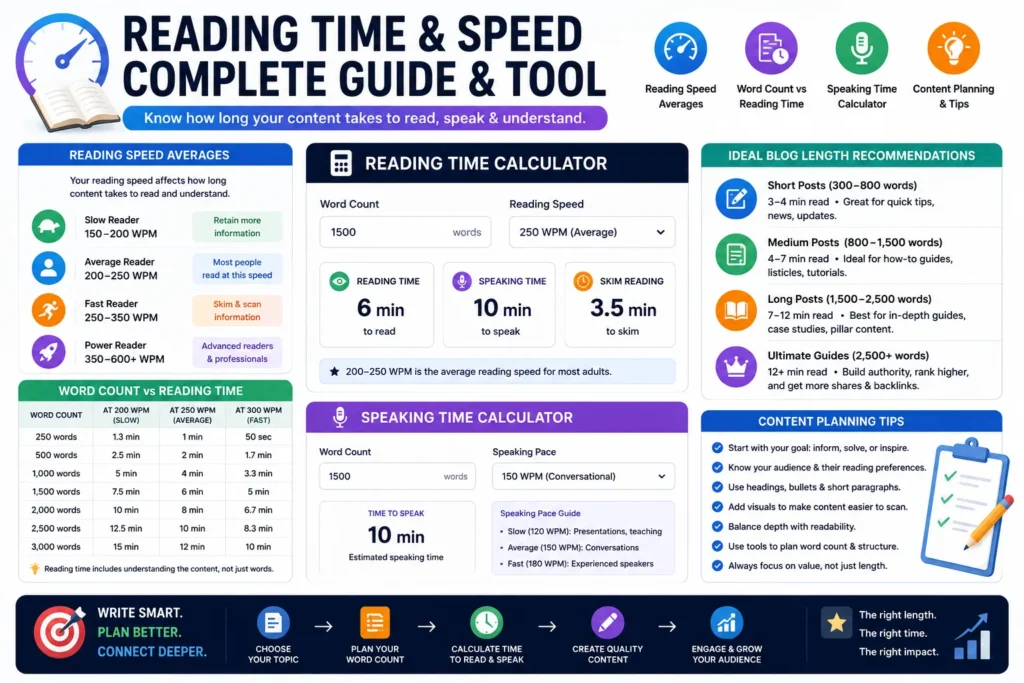
A word counter tells you how long a draft runs; a reading-time estimate tells you how long someone will spend reading it. This tool handles both as you paste or type, with separate totals for characters with and without spaces.
Students lean on it for essay limits, bloggers for read-time badges, and marketers for keeping social copy tight. Paste your text above and every count updates with each keystroke.
Curious about novel lengths, essay caps, or page conversions? Our full word count and reading time guide covers all of it.
How to use the Word & Reading Time Counter
- Add your draft: type or paste the essay, article, script, or other text you want to measure.
- Review live counts: check words and characters with and without spaces as the text changes.
- Check reading time: compare the estimates for average reading at 200 WPM and faster reading at 250 WPM.
- Revise and recheck: edit the draft until its length and reading time fit your target.
Who uses a word counter?
- Students: Check Common App essays, personal statements, and assignment minimums before submitting.
- Authors: Track chapter length against publisher or genre targets.
- Marketers: Keep email subject lines, ad copy, and social posts within platform limits.
- Translators: Compare source and target word counts, including CJK text where each character may count as a word.
For caption and meta-field limits, pair this with the Character Counter. For printed page estimates, try Words Per Page.
What this tool counts
- Words: Tokens separated by whitespace, updated as you type.
- Characters: Total length with and without spaces, useful for social and SEO fields.
- Reading time: Estimated minutes at 200 WPM (average) and 250 WPM (fast).
- Non-Latin text: CJK and other scripts are counted using the same rules as the rest of the theme word tools.
Common use cases
- Blog read-time badges
- Newsletter section planning
- Video script and spoken content pacing
- Academic reading workload estimates
Trimming a long draft? The Edit Counter shows how many words you cut between versions. Job seekers can check resume length with the Resume Word/Page Counter, and SEO teams can benchmark published pages with Webpage Word Count.
Google Slides and other apps
Google Slides skips a built-in word count entirely, so copy your slide text into this tool instead, or export speaker notes to plain text first. That same trick works for PDFs, Word docs, or really any editor that lets you select and copy.