
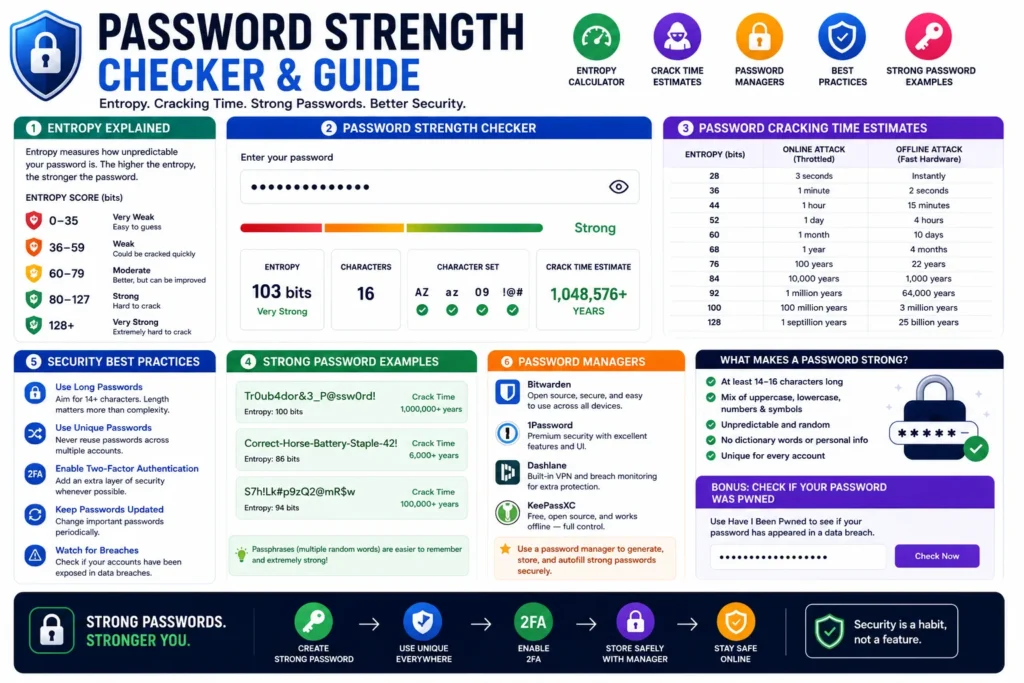
Test Password Strength Before You Reuse It
Weak passwords are still one of the most common ways accounts get compromised. This checker gives you a quick local estimate based on length and complexity, so you can fix a weak draft right away rather than finding out the hard way.
How to use the Password Strength Checker
- Type a password: enter the password you want to assess; the check runs locally in your browser.
- Review the result: check the strength rating, length, character mix, and estimated crack time.
- Fix weak points: add length and variety or replace predictable words and patterns.
- Test again: confirm the revised password produces a stronger result before saving it in your password manager.
How To Improve Password Strength
- Aim for at least 12 characters.
- Mix uppercase, lowercase, numbers, and symbols together.
- Steer clear of personal info and predictable patterns.
- Give every account its own unique password.
For the best security hygiene, pair strong passwords with a reputable password manager and MFA.