
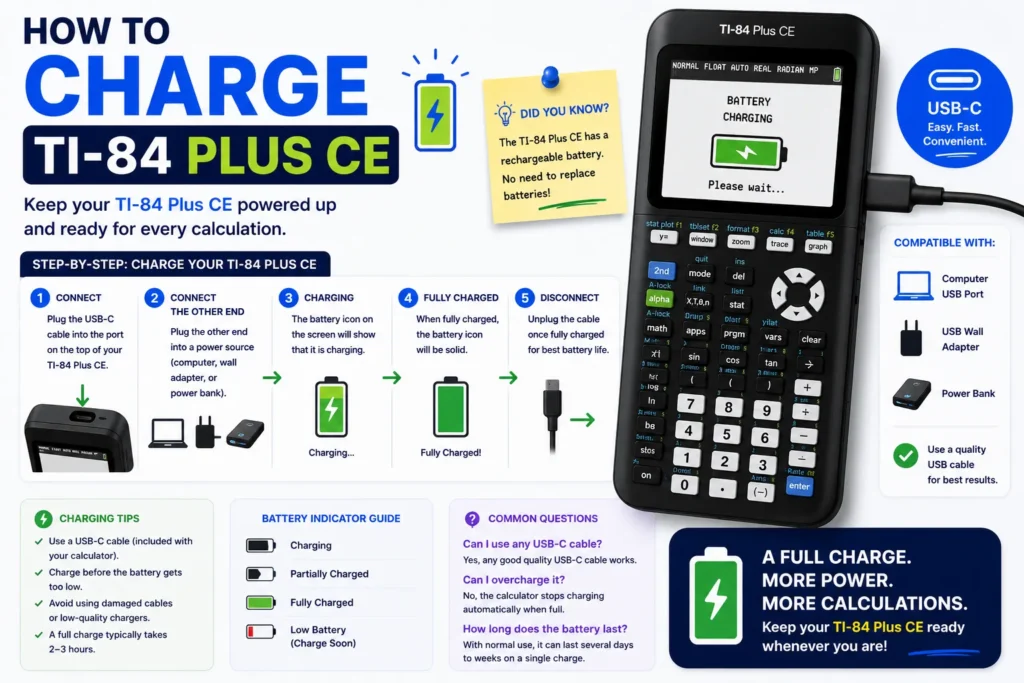
The TI-84 Plus CE uses a rechargeable battery. This guide explains how to charge TI-84 Plus CE models with the official TI-84 Plus CE charger, how to charge TI-84 Plus CE with computer USB ports, and how to charge TI-84 Plus CE without charger alternatives — plus how to know if TI-84 Plus CE is charging and what the TI-84 Plus CE charging orange light means. The TI-84 Plus CE Python edition uses the same charging port.
Charging port and cable
Most CE units use a mini-USB or USB-C port on the bottom edge (check your revision). Use the cable from the box or a certified 5 V USB cable.
TI-84 Plus CE charger specs
- Voltage: 5 V USB
- Current: at least 500 mA recommended
- Time: about four hours from empty to full
How to charge TI-84 Plus CE with computer
- Plug the calculator into a powered USB port on a laptop or desktop.
- Avoid unpowered hubs that drop below 500 mA.
- Watch the battery icon in the status bar — flashing means charging.
How to charge without the original charger
A phone wall brick (5 V) or power bank works if it delivers stable USB power. Avoid fast-charge-only ports that negotiate higher voltages without USB-PD compatibility.
How to know if TI-84 Plus CE is charging
- Charging: flashing battery icon (top status bar).
- Full: solid full battery icon.
- Low: empty icon — charge before tests.
TI-84 Plus CE charging orange light
Some dock or cable revisions show an orange LED while charging and green when full. If the LED stays off, reseat the cable or try the back-panel reset from our reset tutorial.
Validating OS loop (won’t charge)
If the calculator stuck on Validating OS, see the detailed fixes in the complete TI-84 guide — hardware reset plus a stronger adapter usually resolves it.
Study while it charges
Use the TI-84 Plus CE calculator online on a laptop while the handheld charges overnight.
Printable summary
Save this page as your how to charge ti 84 plus ce pdf reference — cable specs, indicators, and troubleshooting in one place.
Related TI-84 Plus CE resources
- TI-84 Plus CE complete guide — stats, SAT, troubleshooting
- TI-84 Plus CE Online Calculator — practice in your browser
- Write & transfer notes — NoteFolio & TI Connect CE
- Graphing equations — Y=, solver, vertical lines
- Fractions — enter, convert, multiply
- Clear memory — history, lists, graph DB
- Reset tutorial — RAM, factory, exam prep
- Slope Calculator — verify linear equations