
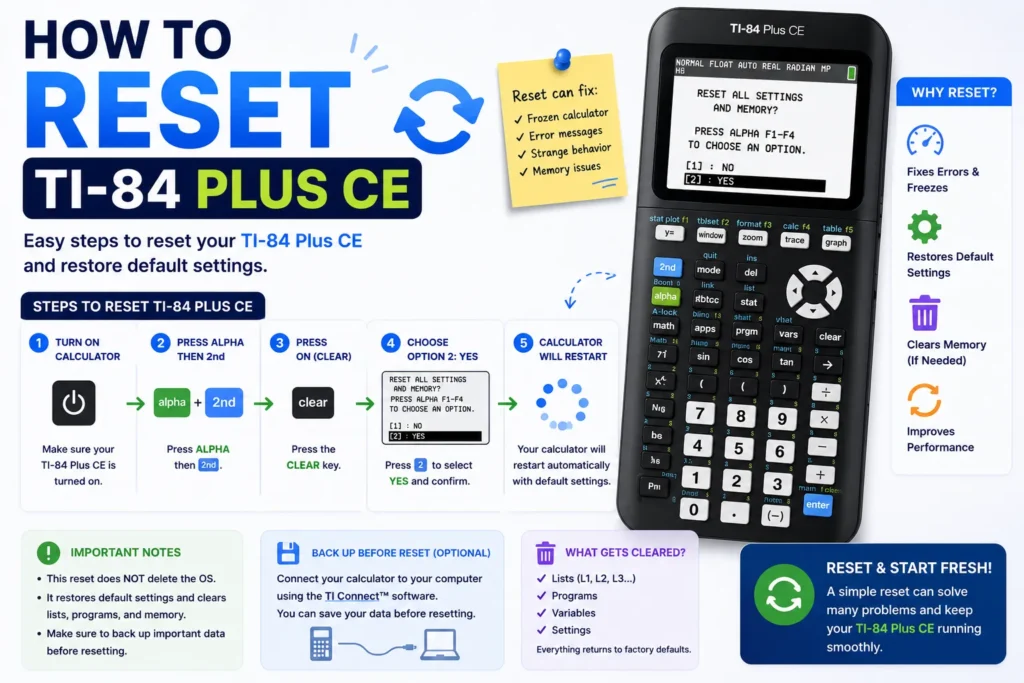
This TI-84 Plus CE reset tutorial covers how to reset TI-84 Plus CE calculators safely: soft reset, how to clear RAM on TI 84 Plus, how to factory reset TI-84 Plus CE, and how to reset TI-84 without deleting programs. We also explain why a fake memory clear TI-84 Plus CE is not a substitute for real exam rules, plus notes for how to factory reset TI 84 Plus CE Python and how to reset TI-83 Plus owners.
Watch: TI-84 Plus CE reset tutorial
Soft reset (frozen screen)
- Press ON once.
- If still frozen, press the recessed RESET button on the back for two seconds.
- Reconnect power if the TI-84 Plus CE battery died — see how to charge TI-84 Plus CE.
Clear RAM (Reset RAM)
- 2nd → + (MEM) → 7:Reset…
- Choose All RAM → Reset → confirm.
Archived apps stay; RAM programs and lists are erased. For lighter cleanup, see how to clear TI-84 memory.
Reset without deleting programs
- 2nd → + → 7:Reset… → 2:Defaults → Reset.
- Archive important programs first: MEM → Mem Mgmt → Archive.
Back up NoteFolio files on your computer before any reset — notes transfer guide.
Factory reset (All Memory)
- 2nd → + → 7:Reset…
- Arrow to the All tab → All Memory → confirm.
Required when proctors demand a clean calculator with no stored notes or apps.
Fake memory clear vs real exam rules
Some students search for a fake memory clear to hide programs. Proctors and teachers may inspect memory or require All Memory resets. Use legitimate preparation — archive allowed apps, then reset per policy.
TI-84 Plus CE Python edition
OS-level reset still uses the MEM menu. Inside Python, clear session variables:
import gc
gc.collect()
That does not replace a factory reset for test compliance.
TI-83 Plus reset
TI-83 Plus uses the same MEM → Reset flow without the color CE body. Steps match All RAM and All Memory naming on comparable OS versions.
Maintenance context: TI-84 manual Level 5.
Related TI-84 Plus CE resources
- TI-84 Plus CE complete guide — stats, SAT, troubleshooting
- TI-84 Plus CE Online Calculator — practice in your browser
- Write & transfer notes — NoteFolio & TI Connect CE
- Graphing equations — Y=, solver, vertical lines
- Fractions — enter, convert, multiply
- Clear memory — history, lists, graph DB
- Charging guide — cable, indicators, battery
- Slope Calculator — verify linear equations