
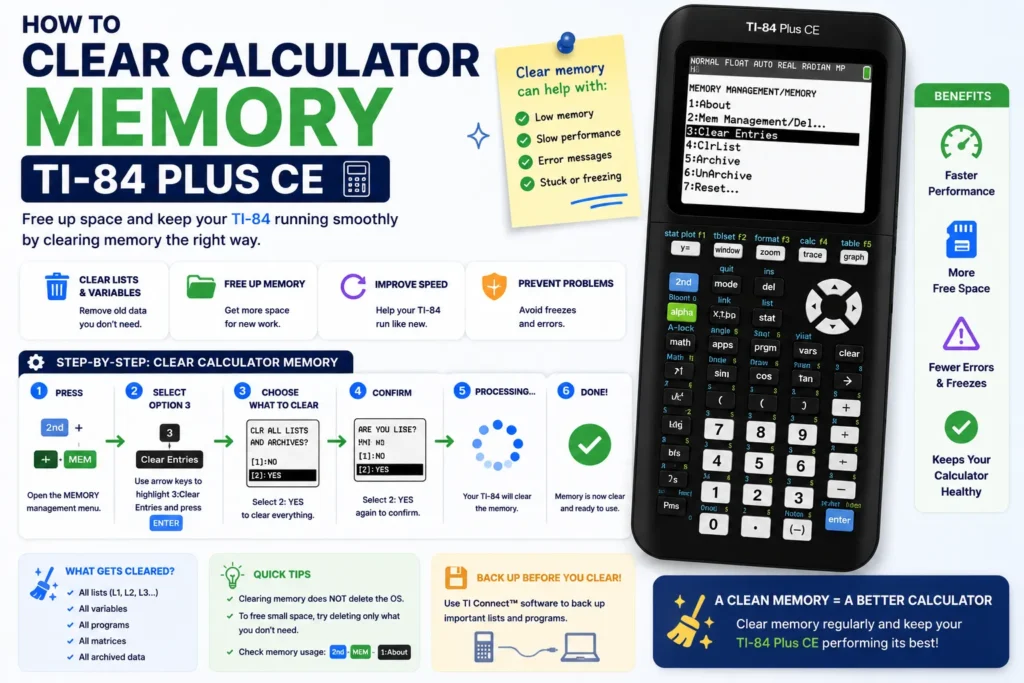
Need to clear TI-84 memory, run a memory clear TI-84 Plus CE, or clear graphing calculator memory without wiping everything? This guide explains how to clear calculator history TI-84 Plus, delete variables and lists, and refresh the graph database — and when to use a full factory reset instead.
Watch: How to clear TI-84 memory
When to clear memory vs reset
Memory clear targets history, lists, or graph data. Factory reset removes apps, programs, and archived files — required before some proctored exams. Use our TI-84 Plus CE reset tutorial for All Memory wipes.
RAM vs Archive vs Apps
| Storage | What lives here | Typical clear action |
|---|---|---|
| RAM | Variables, lists, history, RAM programs | ClrAllLists, DelVar, Reset RAM |
| Archive | Archived programs and apps | Delete from Mem Mgmt |
| Apps | NoteFolio, Cabri, etc. | Delete app or full reset |
How to clear calculator history TI-84 Plus
On the home screen, scroll to an old entry and press CLEAR line by line, or clear RAM variables that store previous answers. For a fresh session before graphing, clear Y= lines you no longer need — see the graphing equations guide.
Clear variables and lists
- STAT → 4:ClrList → choose
L1,L2, etc. - Catalog (2nd → 0) →
ClrAllListsfor everything at once. DelVar Xstyle commands remove single variables from the home screen.
Clear graph database and plots
Open Y= and press CLEAR on each line. Check 2nd → STAT PLOT and turn off unused plots. If the graph still looks wrong, ZOOM → 6:ZStandard.
Memory clear TI-84 Plus CE from the MEM menu
- 2nd → + (MEM).
- 2:Mem Mgmt/Del… to delete specific files.
- Run
GarbageCollectfrom the catalog if archive space is fragmented.
Freeing space also helps before you transfer notes to TI-84 Plus CE with NoteFolio.
Common problems after a partial clear
- ERR:INVALID DIM — list missing; re-enter data or clear the stat plot reference.
- Still no graph — confirm plot is enabled and window fits the function.
Full maintenance workflows live in Level 5 of the TI-84 manual.
Related TI-84 Plus CE resources
- TI-84 Plus CE complete guide — stats, SAT, troubleshooting
- TI-84 Plus CE Online Calculator — practice in your browser
- Write & transfer notes — NoteFolio & TI Connect CE
- Graphing equations — Y=, solver, vertical lines
- Fractions — enter, convert, multiply
- Reset tutorial — RAM, factory, exam prep
- Charging guide — cable, indicators, battery
- Slope Calculator — verify linear equations