
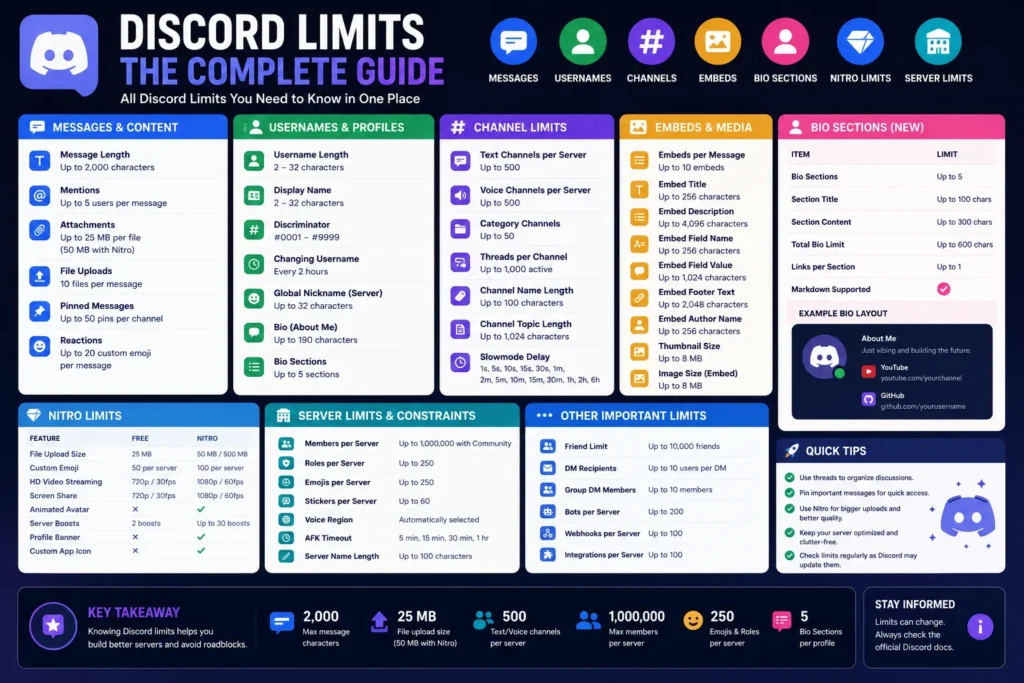
Discord message length limits can break announcements and moderation templates if you post without checking. This guide explains how to keep drafts inside limits with the Discord Character Limit Checker.
Try it free: Open the Discord Character Limit Checker — runs entirely in your browser, no account or upload required.
Why this checker helps
- Avoid failed sends on long messages.
- Plan multi-part announcements cleanly.
- Keep bot responses readable and chunked.
For cross-platform limit checks, keep the Character Counter in your writing toolkit.
Writing tools resources on ShoutingNow
- Discord Character Limit Checker — free online tool
- Discord Character Limit Checker Guide: Plan Messages Before You Send — full walkthrough (this article)
- Writing Tools Playbook — cluster hub for all writing utilities
- Character Counter
- X/Twitter Thread Length Calculator